A missing lockout tag isn’t just a paperwork gap—it’s a ticking hazard. Workers assume machines are safe, reach in, and in seconds, lives change. The root cause? A breakdown in communication. That’s where a well-designed lockout tagout tag template becomes non-negotiable. It’s not about ticking a compliance box; it’s about creating a visual, unambiguous signal that says: This equipment is dangerous. Do not operate.
Yet, most companies still rely on generic, handwritten tags or poorly adapted digital forms. These fail under pressure. Illegible handwriting, missing details, or vague warnings render them useless during high-stress moments. A true lockout tagout tag template must be standardized, durable, and rich with critical information—because hesitation kills.
Let’s break down what makes a tag work, how to build one, and where most organizations go wrong.
What a Lockout Tagout Tag Template Must Include
A functional LOTO tag isn’t just a piece of plastic with text. It’s a communication tool engineered for clarity under real conditions. Think grease-covered gloves, dim lighting, and time pressure. Your template must survive that.
Essential elements of a high-performance lockout tagout tag template:
- Employee Name & Contact Info – Who applied the lock? Who can authorize removal?
- Date & Time of Lockout – When did the isolation begin? This helps track how long equipment has been offline.
- Equipment Identification – Exact machine name, ID number, or location. Not “pump” —“North Process Line Pump #4B.”
- Hazard Type – Electrical, hydraulic, mechanical, thermal, pneumatic? Be specific.
- Reason for Lockout – Maintenance, repair, cleaning? Workers need context.
- Signature Field – Adds accountability. Digital or physical, it must be traceable.
- Warning Statement – Bold, standardized language: “Do Not Operate – Personnel at Work.”
- Lock Number Reference – Links tag to physical lock for audit trails.
Skip any of these, and you risk ambiguity. For example, a tag that says “Under Repair” on a conveyor system in a 20-line facility doesn’t tell anyone which conveyor—or who’s working on it. That’s a near-miss waiting to happen.
Common Mistakes That Undermine LOTO Tags
Even with a solid template, execution fails when organizations ignore human and operational realities.
1. Using Handwritten Tags Exclusively Pencil on a flimsy tag fades. Ink smears. Handwriting varies. In a crisis, misreading a name or time can be fatal. Templates should be pre-printed or digitally generated to ensure legibility.
2. One Template for All Hazards A boiler lockout tag needs different warnings than a conveyor belt. Using the same generic form for high-pressure steam and low-voltage circuits dilutes urgency. Customize by hazard class.
3. Tags Without Locks A tag alone is not lockout. OSHA requires both: a physical lock (energy isolation) and a tag (communication). Never allow tagging without locking. It’s a compliance violation and a safety fraud.
4. No Procedure Mapping The tag should reference a specific LOTO procedure. Workers should be able to scan a QR code or note a SOP number to access step-by-step instructions. A tag without context is a guessing game.

5. Poor Material Choice Paper tags disintegrate in wet or oily environments. Use polyester or vinyl tags with UV-resistant printing. Magnetic or adhesive backings fail on dirty surfaces—opt for durable tie-wraps.
Real-World Use Cases: Templates in Action
Case 1: Chemical Plant Valve Isolation A technician isolates a valve during a reactor cleaning. The tag includes: - Name: J. Rivera (Ext. 4421) - Equipment: Reactor B – Inlet Valve V-207 - Hazard: High-pressure caustic solution - Time: 08:15 AM, March 14 - Reason: Scheduled cleaning and seal replacement
The tag uses red text on yellow background—high contrast for visibility. A QR code links to the isolation procedure. Nearby operators see it and know not to bypass the line.
Case 2: Manufacturing Line Maintenance On a packaging line, a jam requires guard removal. The tag states: - “Danger – Guard Removed. Mechanical & Electrical Hazards.” - Technician: M. Tran - Lock ID: LK-8841 - Start: 10:30 AM
Because the line runs multiple shifts, the tag’s durability matters. A laminated, weather-resistant version stays readable for the 6-hour repair window.
These aren’t theoretical. They’re daily scenarios where a well-structured template prevents restarts during servicing.
How to Customize Your Template for Maximum Impact
A generic template from an online PDF won’t cut it. You need a version tailored to your environment.
Start with a base format—digital or print—that includes all required fields. Then:
- Color-Code by Hazard Type
- - Red: Electrical
- - Yellow: Mechanical
- - Blue: Hydraulic/Pneumatic
- - Green: Energy Restored (rare, for verification only)
Color triggers fast recognition—even from a distance.
- Add Site-Specific Fields
- If your facility uses permit-to-work systems, include a permit ID field. For multi-craft work, add a “Second Lock Applied By” line.
- Integrate with LOTO Procedures
- Each piece of equipment should have an associated LOTO procedure. The tag must reference it—via number, QR code, or URL.
- Use Dual-Language Tags if Needed
- In multilingual workplaces, bilingual tags (e.g., English/Spanish) ensure comprehension. Place languages side-by-side—don’t shrink text.
- Include a Removal Authorization Section
- Add a small box for supervisor sign-off upon completion. This closes the loop and supports audits.
A good template evolves. Review tags quarterly. Ask workers: “Is this clear? What’s missing?” Their feedback is gold.
5 Proven LOTO Tag Template Solutions
While you can build your own, many organizations benefit from tested platforms. Here are five reliable options:
| Solution | Type | Key Features | Best For |
|---|---|---|---|
| Brady LOTO-PRO Software | Digital Template Builder | Drag-and-drop tag design, QR integration, OSHA-aligned fields | Mid to large facilities with digital workflows |
| Grainger Pre-Printed Tags | Physical Templates | Durable, color-coded, bulk packs | Smaller shops needing plug-and-play |
| Seton MyLockout App | Mobile-Based | Generate tags via smartphone, cloud backup, audit logs | Teams on the move, decentralized operations |
| Master Lock Tower LOTO Station | Physical + Template | Includes standardized tag stock and lock storage | Facilities standardizing across shifts |
| SafetySign.com Custom Tags | Print-on-Demand | Full customization, weather-resistant material | Sites with unique hazard profiles |
Each has trade-offs. Digital tools offer traceability but need training. Pre-printed tags are simple but less flexible. Pick based on your team’s workflow—not just price.
Why Compliance Isn’t Enough
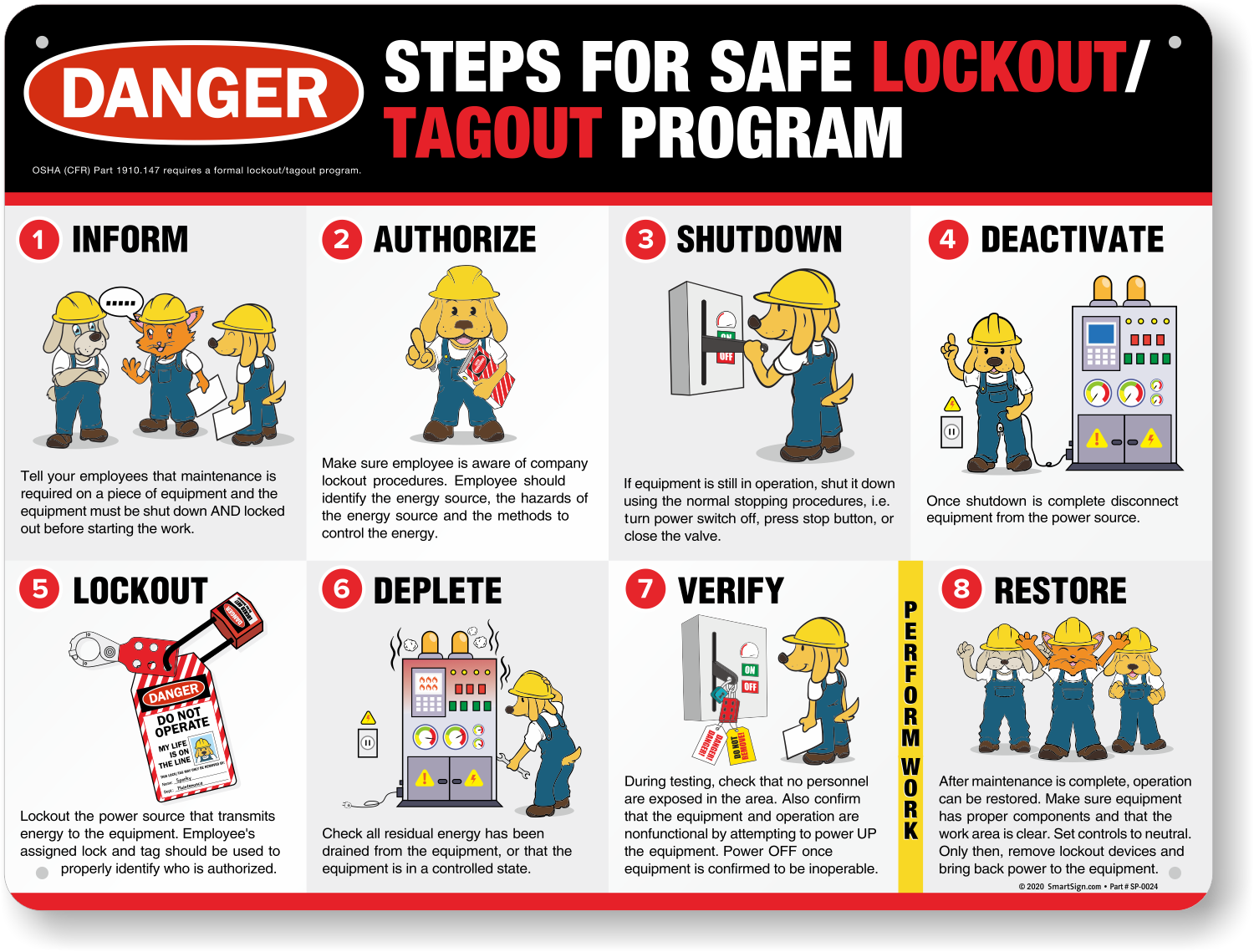
OSHA 1910.147 mandates tags that “indicate that the machine or equipment is not to be operated until the tag is removed.” But compliance is the floor, not the ceiling.
A tag that meets OSHA but lacks clarity fails its real mission: preventing injury. Consider this—a 2022 NIOSH report found that 60% of LOTO-related incidents involved tags that were either missing, illegible, or incomplete. The regulation was followed in paperwork, but the human factor was ignored.
Your template must surpass minimums. Test it in real conditions: - Can a new hire read it from 3 feet away? - Does it stay intact after 8 hours in a humid pit? - Can a night-shift worker contact the person listed?
If not, revise.
Building a Culture Around the Tag
A template is only as strong as the culture behind it. Workers must trust that every tag means business.
Train teams not just on how to fill out a tag, but why. Use real near-miss stories. Show photos of damaged equipment or injuries from improper isolation. Make the consequence tangible.
Empower employees to challenge incomplete tags. A tag without a name or time should be treated as invalid. Supervisors must enforce this—consistently.
Run quarterly tag audits. Check 10 random tags for completeness, legibility, and lock alignment. Share results. Celebrate teams with 100% compliance.
Closing the Loop: From Template to Trust
A lockout tagout tag template isn’t paperwork. It’s a promise. A promise that when someone isolates a machine, their safety is visible, respected, and protected.
Start today: Audit your current tags. Are they handwritten? Faded? Missing key data? Redesign them using the principles here. Involve frontline workers. Print or deploy a pilot version. Test it under real conditions.
Then scale. Integrate it with your LOTO program, training, and audits.
A great template doesn’t just prevent accidents—it builds a culture where safety is spoken, seen, and taken seriously. That’s worth more than compliance. That’s peace of mind.
FAQ
What should be on a lockout tagout tag? A lockout tag must include the worker’s name, contact info, date and time of lockout, equipment ID, hazard type, reason for lockout, and a clear warning like “Do Not Operate.”
Can you use a tag without a lock? No. OSHA requires both a lock (to isolate energy) and a tag (to communicate). A tag alone does not comply with the standard and is unsafe.
Are digital LOTO tags acceptable? Yes, if they are durable, legible, and securely attached. Many digital systems generate printable or scannable tags linked to lock IDs and procedures.
How long can a LOTO tag stay on? Tags should remain until the work is complete and the authorized employee removes them. Extended lockouts require shift交接 procedures and re-verification.
Do LOTO tags need to be standardized? Yes. Standardized tags ensure consistency, improve recognition, and support training. Customization should enhance, not replace, core elements.
Can multiple people use the same tag? No. Each worker must apply their own lock and tag during group lockout. A single tag doesn’t reflect individual accountability.
What’s the difference between lockout and tagout? Lockout uses a physical lock to prevent equipment startup. Tagout uses a warning tag. Tagout alone is less protective and only allowed when lockout isn’t feasible.
What mistakes should you avoid? Avoid generic choices, weak validation, and decisions based only on marketing claims.
What is the next best step? Shortlist the most relevant options, validate them quickly, and refine from real-world results.